

 AU & NZ
 SG
 MY
 US
 IE
 Access Charity Ad Grants
Google Ad Grants: definitive guide
Struggling to get your charity's message heard online? Don’t have the time or knowledge to manage paid search? Google Ad Grants might be exactly what you're searching for.
This guide covers what Google Ad Grants is, who's eligible, how to apply, how to use your Google Grant well, and what AI search means for it.
Main takeaways:
- The Google Ad Grant, still often called Google Grants, gives eligible charities up to $10,000 a month in free Google Search ads.
- Most UK registered charities can apply. Government bodies, hospitals and schools can't, though their charitable arms often can.
- Applying takes five steps, from checking eligibility to submitting your account for review.
- To keep the grant, your account needs to follow Google's rules, including a minimum clickthrough rate. A managed service, like Access Charity Ad Grants, helps you stay compliant and maximise your grant.
- AI answers are changing how people search, which makes a well-run grant more valuable.

What are Google Ad Grants?
Google Ad Grants provide UK charities and not-for-profit organisations with up to $10,000 per month in free Google Ads advertising credit.
Think of it as Google's way of helping good causes reach people who are actively searching for services like yours on online.
When someone searches for keyword terms related to your charity's work, your ads can appear at the top of Google's search results – without you paying Google a penny.
All charities have unique goals. Whether you're trying to recruit volunteers, build awareness, promote events or increase donations, this windfall can transform how you reach new supporters and increase your charity’s profile.
Many people still call it Google Grants, its original name, and it's good to know that Google Grants and Google Ad Grants are the same thing.
| What | Detail |
|---|---|
| Monthly grant | Up to $10,000 in Google Search ads |
| Daily budget | Around $329, shared across all your campaigns |
| Yearly value | Up to $120,000 |
| Minimum clickthrough rate | 5% across your account |
| Typical review time | Within two weeks |
“We simply could not reach people and create the impact we do without the awareness generated by these Ad Grants.”
What are the benefits of Google Ad Grants for charities?
In an increasingly connected and noisy world, it’s getting tougher for charities and non-profits to get their message heard.
Paid ads aren't only expensive, they’re hard to navigate and manage without a resource that really knows what they’re doing. Often, charities focus their digital marketing efforts on social media strategies instead – putting all their eggs in another (extremely crowded) basket.
Unlike social media, where you're competing for mere seconds of attention in busy feeds, Google Ads place your charity front-and-centre, at the exact moment someone is looking for what you offer. You only appear when people are genuinely interested. Someone scrolling social media might scroll past your post, but someone searching "food bank volunteer Manchester" is actively looking to help. This targeted approach means every click has real potential to become a volunteer, donor or supporter.
From working with hundreds of charities, here’s some other big benefits:
- A free marketing budget to reach new audiences and send them to your most important web pages.
- Flexibility. Split your budget across campaigns, or put more behind the goals that matter most, whether that's awareness, donations or sign-ups.
- Insight you can act on. With Google Analytics and conversion tracking, you can see which searches and ads lead to donations and sign-ups, and use that to shape future campaigns.
Charities using the grant well often see more impressions, more clicks, more engagement and more income. Afghanaid doubled its donations during a crisis appeal.
“We secured a 100% boost in the number of donations with Ad Grants. The support that Access has provided has been invaluable for driving more traffic to our Crisis Appeal page.” - Natalie Deane, Afghanaid
Who qualifies for Google Ad Grants in the UK?
Are you eligible? Most charities are, you'll just need to meet specific criteria set by Google, and then be approved through a pre-qualification process.
How do you qualify for Google Ad Grants?
To request a ‘Google for Nonprofits’ account, you must be a charitable organisation in good standing, and meet the full eligibility/pre-qualification requirements in your country.
Essential Requirements:
- Valid charity status with the UK Charity Commission (England and Wales), NICC (Northern Ireland) or OSCR (Scotland)
- Recognition as a charity by HMRC for tax purposes, including churches.
- Registration with GoodStack for verification
- Agree to Google for Nonprofits’ terms of service
- A good quality website that meets Google's quality standards (more on this below)
- Meet any other additional eligibility requirements for your respective country
Charity status can depend on where you're based. For example, your income must exceed £5000, and satisfy the definition of a charity in the Charities Act, to register with the Charity Commission in England in Wales. In Scotland, a voluntary organisation must meet the ‘Charity Test' as set out by OSCR, the Scottish Charity Regulator.
Who isn't eligible?
There are a few organisations not covered, including:
- Government entities and organisations
- Hospitals and medical groups *
- Schools and universities (though philanthropic arms of educational institutions can apply)
* * A hospital or health care organisation aren't eligible, but charitable arms or foundations associated with healthcare organisations are eligible.
What does Google expect from your website?
Google's website policy for the grant asks for:
- A clear description of your organisation, mission and activities.
- Substantial, useful content that's unique to you.
- Up-to-date events and information.
- Clear navigation and calls to action.
- Pages that load quickly, with no broken links, secured with HTTPS.
It's worth reading Google's full website policy before you apply. A strong website helps with AI search too, which is covered later in this guide.
How to apply for Google Grants
Here's five simple steps to applying for a Google Grant:
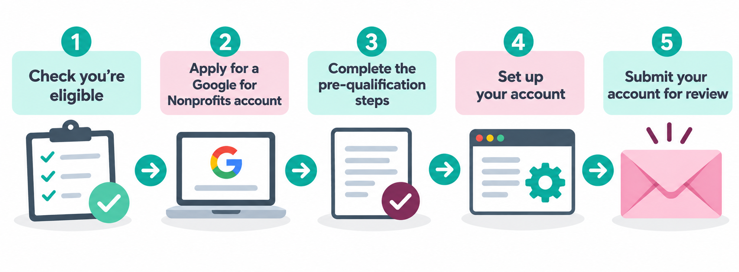
1. Check you're eligible
Make sure your charity is based in a country where the grant is available and meets the criteria above.
2. Apply for a Google for Nonprofits account
Start your application here. You'll need to register with GoodStack first. They handle verification and give you a token to complete your Google registration.
3. Complete the pre-qualification steps
Once your Google for Nonprofits account is approved, there's a short survey (around 10 minutes) to help Google understand your organisation. You'll also need to complete Google's Ad Grants training: a short video on the programme's rules, followed by a quiz. Your account won't be activated until you've done both.
4. Set up your account
Google's enrolment guide walks you through it. You'll:
- Describe your organisation.
- Choose where your ads will show.
- Pick the services or causes to promote.
- Write your first ads.
Make your ads specific, with a clear call to action, such as "Volunteer with us today", "Donate to help local families" or "Find support near you".
5. Submit your account for review
Google checks your account against its policies. You'll usually hear back by email within two weeks.
How to use Google Ad Grants: 8 ideas for charities
Most charities use the grant to send more people to their most important web pages. Here's what that can look like:
-
Promoting urgent appeals - Drive traffic to emergency fundraising campaigns
-
Recruiting volunteers - Target searches like "volunteering opportunities near me"
-
Supporting helplines - Ensure your crisis support services appear when people need them most
-
Event promotion - Fill seats at fundraising events and awareness campaigns
-
Education campaigns - Share information about your cause with interested audiences
-
Service accessibility - Help people find your support services, grants, or drop-in centers
-
Newsletter signups - Build your supporter database through targeted content
-
Online shop promotion - Drive sales to your charity retail offerings
Now you know the brilliant things you can do with the grant, how do you get it?
Short on time to manage it yourself?
How to make the most of your Google Grants budget
Charities are experts at making every pound count, and the grant is no different. Your daily budget is shared across all your campaigns, so the aim is for each click to have real potential to become a supporter.
Google's two starting tips:
- Put more budget behind the campaigns that support your most important goals.
- Use specific keywords closely linked to your mission. They improve your Quality Score and stretch your budget further.
Beyond those, here's what works for charities.
Build keywords around your best content
Start with what your website already has: donation pages, events, volunteering opportunities. Audit which pages matter most to your goals, then build keywords around sending people to them. Free tools can show you what people search for, including Google Keyword Planner, Google's search suggestions and related searches, and AnswerThePublic.
Keep each ad group focused on one theme. Don't mix donation keywords with volunteering ones. Someone who clicks an ad about volunteering should land on a volunteering page, not your homepage.
Include long-tail keywords
Long-tail keywords are longer, more specific phrases, and they help you reach people who know exactly what they want.
Compare "food bank" with "food bank volunteering Nottinghamshire". The first person might need help themselves. The second is ready to volunteer, in a specific place. Local charities can do especially well here. A food bank in Mansfield is better off targeting "food bank volunteering Mansfield" than competing with national charities for "food bank volunteering".
Long-tail matters even more as people search in fuller sentences, which AI search encourages. Balance specific phrases with a few broader terms to reach people at different stages.
Add negative keywords
Negative keywords are bouncers for your ads. They keep out searches that won't lead anywhere, so your budget goes on people who can help.
That Mansfield food bank might attract clicks from "food banks in London" or "food bank jobs". Adding location negatives ("London", "Scotland", "USA") and terms like "jobs" or "careers" stops those clicks before they happen.
Check your search terms report
Your search terms report shows the exact searches that triggered your ads. It's a window into how people describe your work. You might call it "community outreach" while people search for "local help".
Check it regularly, ideally weekly, to:
- Find new long-tail keywords to add.
- Spot irrelevant searches to add as negatives.
- Learn the language your supporters use, for your ads and your website.
Which KPIs should your charity prioritise?
Google Ads has plenty of numbers; these five tell you what's working.
Tip: If you only watch one, make it conversion rate. It's the clearest sign your ads are moving your mission forward. Track your own rate over time and aim to better it.
| KPI | What it tells you | How to improve it |
|---|---|---|
| Impressions | How often your ads are shown. If they aren't seen, nothing else counts. | Match ad copy to your keywords, write clear headlines and keep landing pages relevant. |
| Clickthrough rate (CTR) | The share of people who click after seeing your ad. Grant accounts must keep at least 5%. | Test headlines and descriptions, add negative keywords and write copy that connects. |
| Conversion rate | The share of clicks that lead to a donation, sign-up or other action. | Make sure each landing page delivers what the ad promised, with a clear call to action. |
| Cost per conversion | How much budget each action uses, showing which campaigns give the best value. | Shift budget towards campaigns that convert for less, say £15 per volunteer rather than £45. |
| Quality Score | Google's 1–10 rating of how relevant your ads and pages are. | Line up keywords, ads and landing pages around what searchers want. |
"Access Ad Grants takes something complex and simplifies it for us. The ROI speaks volumes, making it easy to justify the marketing spend to our board."
Google Grants rules: how to stay compliant
To keep your Google Grants account active, it needs to follow Google's ongoing rules. If it doesn't, Google can temporarily deactivate it.
The good news is that each rule has a fix, and once your account is back in line you can ask Google to reinstate it. Google sets out the rules in its Ad Grants Policy Compliance Guide and account management policy.
Your compliance checklist:
- Keep an account-level clickthrough rate of at least 5% each month. Two months in a row below 5% can lead to temporary deactivation.
- Track meaningful conversions, like donations or sign-ups, and record at least one conversion a month.
- Use conversion-based Smart bidding, such as Maximise conversions (required for accounts created since April 2019).
- Have at least two ad groups in each campaign, with closely related keywords and ads.
- Use at least two sitelinks.
- Show your ads in the locations where your services are useful.
- Avoid single-word keywords (your own brand name is one exception) and overly generic keywords.
- Pause or remove keywords with a Quality Score of 1 or 2.
- Respond to Google's annual programme survey.
These rules exist to keep grant ads relevant and useful, so people find the help they're looking for. Keeping on top of them takes regular time, so it helps to give one named person responsibility for monthly checks.
Your website also needs to keep meeting Google's website policy.
Google Ad Grants in the AI age
AI Overviews and AI Mode are changing how people find charities, and that makes a well-run Google Grants account more useful, not less.
Google's AI Overviews now put an AI-written answer at the top of many results pages. For charities, that changes how people find you, and how your grant earns its keep.
What does AI search mean for a Google Grant?
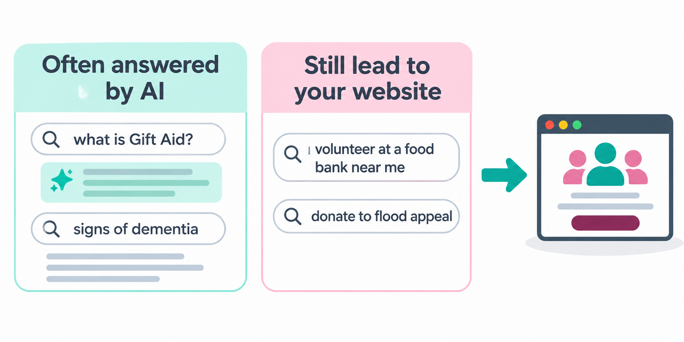
AI answers tend to satisfy simple information searches on the results page, so fewer of those lead to a click. Searches where people want to act, like donating, volunteering or getting support, still need a website at the other end. That's where grant ads do their best work.
So it's worth reviewing where your budget goes. Put the most behind searches that lead to action, and keep information searches where they're central to your mission or lead naturally to a next step.
 Want the full picture? Read Are you in AI answers? How charities get found now, and get ready for what's next, a Q&A guide by Ad Grants specialist Mark Bissoni on getting your charity cited in AI search.
How can a specialist manage my Google Ad Grants account?
Between the application, campaign management, compliance and now AI search, the grant can feel like a lot to juggle.
But, specialists bring time and expertise most charity teams can't spare. A specialist, like Access Charity Ad Grants, can help in three main areas.
1. Your application
The application can be fiddly, and rejections and delays are common. Specialists know what Google looks for, how to get your website ready and which pitfalls to avoid, which can mean securing your grant in weeks rather than months.
2. Your campaigns
Running campaigns well takes ongoing attention: keyword research, bidding, ad testing, performance checks and, increasingly, decisions about AI features. Managed Ad Grants support takes that on, working to your goals while your team focuses on the mission. It typically covers:
- Keyword research and selection.
- Bid management within the grant's rules.
- Ad copy that matches what people are searching for.
- Landing page recommendations.
- Negative keywords to protect your budget.
- Ongoing monitoring of Quality Scores and clickthrough rates.
- Regular changes based on what the data shows.
3. Your reporting
You shouldn't need a digital marketing qualification to understand your results. Good reporting turns Google Ads data into clear insight on what the grant is doing for your goals, weekly, fortnightly or monthly, covering impressions, clickthrough rate, conversions, cost per conversion and Quality Score.
Then weighing it up, compare the cost of support with the real cost of doing it in-house: staff time, training and the work it takes away from your charitable purpose.
Why would we pay for Ad Grants management if the Google Ad Grant is free?
While the Google Ad Grant gives you up to $10,000 a month in free advertising, managing it effectively takes time, expertise and ongoing optimisation.
Without the right setup and support, many charities struggle to spend the full grant or see meaningful results. And, often, figuring out how to apply for the grant and then manage ongoing ads can be overwhelming when you're already stretched thin.
We help you make the most of it, so your ads actually reach the right people and drive real impact, and Charity Ad Grants pricing might surprise you.


“Google is critical for us. Without Ad Grants, families in need might not find us. The Access team are brilliant at structuring campaigns, refreshing ads, and advising on changes in the landscape. It’s an invaluable service.”
Quick answers
What is Google Grants?
Google Grants is the original name for Google Ad Grants, and many people still use it. It's the same programme: Google gives eligible charities up to $10,000 a month in free Search ads, so they can reach people searching for their cause. You apply through Google for Nonprofits, or Access Charity Ad Grants can do it for you.
Who can get a Google Ad Grant?
Registered charities in countries where Google for Nonprofits runs, including the UK. Your charity needs to be verified by Goodstack, Google's validation partner, and agree to Google for Nonprofits' terms. Government organisations, hospitals and healthcare organisations, and schools and universities aren't eligible, although healthcare organisations' charitable arms and educational organisations' philanthropic arms are.
Is the Google Ad Grant really free?
Yes! Google gives eligible charities up to $10,000 a month in Search ads at no cost.
If you choose specialist support to manage it, that's a separate cost.
Does AI search make Google Grants less worthwhile?
Arguably the opposite! AI answers mainly reduce clicks on simple information searches. Searches where people want to donate, volunteer or get support still lead to websites, and that's where grant ads do their best work. As organic clicks get harder to win, free ads count for more.
Learn more: Are you in AI answers? How charities get found now, and get ready for what's next