

 AU & NZ
 SG
SG
 MY
MY
 US
US
 IE
IE

 Access Assemble
Outgrowing your setup? Here's what a volunteer management information system improves
Managing volunteers is one of the most rewarding, and one of the most demanding, roles in the charity sector.
Around 14.2 million people in the UK volunteer formally through a group or organisation each year, contributing an estimated 4.6 billion hours to causes they care about.
Behind every one of those hours is a coordinator or manager keeping track of who's coming, what they've been trained for, and whether anyone remembered to send the shift reminder. It adds up.
If you've not come across volunteer management information system software before, it's a tool that centralises your volunteer records, scheduling, communications and reporting (usually replacing the spreadsheets and disconnected tools that most charities eventually outgrow).
This article covers the common signs that a charity has outgrown its current setup, what a VMS actually does at a functional level, and what to look for when choosing one. Let's explore.

What happens when a charity outgrows its current setup?
Small charities can often manage well with spreadsheets, emails and more informal processes.
However, for larger programmes, small inefficiencies build into everyday frustrations.
You might not notice until someone leaves and takes half the institutional knowledge with them, or until a funding report is due and nobody can pull the hours data together in time!
We regularly speak to charities, and here's some of the key signs that they were growing their existing setup:
- Staff spend hours updating spreadsheets
- Different teams use different processes
- Volunteer data is spread across multiple systems
- You experience frequent rota issues
- You rely heavily on one staff member's knowledge
- You find it hard to report on volunteer activity
A 2024 survey by Nottingham Trent University found that six in ten organisations face ongoing difficulties with volunteer recruitment, and four in ten don't have enough volunteers to meet their objectives. That pressure lands hardest on the people managing them.
Across the sector, only 8% of small charities have a dedicated volunteer manager too, meaning in some organisations, this is a role being squeezed alongside everything else.
What does a volunteer management information system actually do?
In short: it replaces the patchwork with a single reliable system – one that doesn't live in a spreadsheet on someone's desktop and doesn't grind to a halt when a key person is off sick.
A volunteer management information system, like Access Assemble, is designed to support the practical, day-to-day realities of managing volunteers at scale, moving charities from reactive coordination to something more structured.
Here's the key functions it covers:
Centralises volunteer records
A single profile for each volunteer: contact details, availability, skills, DBS status, training records and role history – all updated in real time, accessible to any authorised staff member. No version-control arguments, no chasing colleagues for the right spreadsheet.
Supports volunteer recruitment and retention
Volunteer onboarding is where a significant proportion of volunteers are lost. Research suggests most of the 30–40% charities lose each year drop off within the first three months. A VMS helps with online application forms, automated welcome emails, digital onboarding checklists and role matching based on skills and availability. Less back-and-forth, fewer drop-offs.
Handles scheduling and shift management
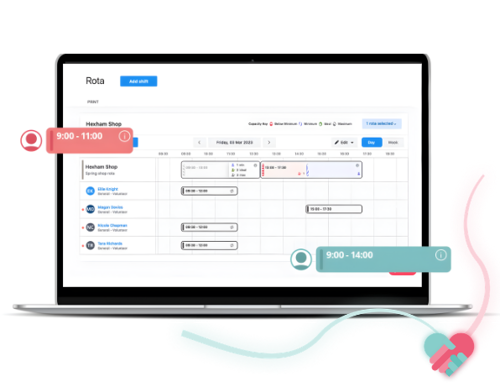
Coordinators create shifts, volunteers sign up through a self-service portal, and automated reminders go out before each one. If someone cancels last-minute, the system alerts other available volunteers – rather than leaving a coordinator chasing through a group chat on a Saturday morning.
Improves communication across the organisation
Instead of individual emails or sprawling group chats, targeted messages go to exactly the right people, everyone that's registered for an event for example, with delivery tracked. No duplication, no gaps.
Manages training, compliance and safeguarding
The system flags expiring DBS checks, prompts volunteers to complete mandatory training before being assigned to roles, and gives managers a clear compliance view across the team. For some programmes, that automated oversight isn't just convenient, it's a safeguarding requirement.
Provides detailed reporting and insights
Instead of building reports from scratch, coordinators generate them on demand: volunteer hours, retention rates, no-show patterns, in a format ready for funders or trustees. Given that a significant proportion of UK charities rate their impact reporting as poor, having that data readily available is a real advantage.
What does a volunteer management information system change operationally?
The cumulative effect shows up in a few consistent ways. Managers spend less time on administrative tasks (the chasing, the data entry, the rota fire-fighting) and more time on the parts of the role that actually require human judgement.
Recruitment and onboarding can become faster and more consistent, which matters both for the volunteer experience and for safeguarding. Reporting that previously took hours can be done in minutes. For most growing charities, those aren't minor efficiencies.
It can be difficult to visualise what actually changes when a VMS is introduced, especially if current processes are deeply embedded in day-to-day working.
This table shows how other charities have benefitted:
Before
- Multiple manual spreadsheets
- Email-based coordination
- Reactive rota management
- Scattered volunteer data
- Manual reporting
After
- One centralised system
- Structured workflows and tracking
- Planned scheduling and coverage
- Unified, accurate records
- Automated real-time insights
Mencap grew their volunteer base by 71% in a year
The Mencap team supports around 2,000 volunteers across the UK each year. It's a familiar tale: managing applications, references, DBS checks and updates across such a dispersed network was taking a serious toll on staff time.
"The time spent just administrating everything was huge. The process didn't reflect the experience we wanted to give our volunteers. It was hard to make volunteers feel part of something bigger. That matters to us.”
- Matt Hatt, Volunteering Services Manager, Mencap
After bringing in a volunteer management information system, volunteer numbers grew by 71% in a year, the proportion of volunteers with a learning disability in retail increased by 18%, and the team finally had the data to understand who their volunteers were and what they needed.
What to look for
When choosing your volunteer management information system, the right features matter – but so does finding something that fits the way your charity actually works. Here's what's worth comparing:
- Ease of use: If staff and volunteers find it difficult to use, it won't get used consistently. Straightforward wins every time.
- Mobile accessibility: Volunteer management doesn't always happen at a desk, mobile access keeps things moving on-site and on the go.
- Volunteer self-service: When volunteers can update their own details, check schedules and sign up for shifts, it reduces admin and tends to improve engagement too.
- Integration options: A VMS that connects with existing CRM, fundraising and finance tools removes the need to re-enter the same data across multiple systems. (See what Access Assemble integrates with)
- Custom workflows: Every charity operates differently. A good VMS adapts to existing processes rather than forcing teams to work around it.
- Security and compliance features: Volunteer records contain sensitive data. Role-based permissions, audit trails and secure document storage aren't optional extras, they're essential.
- Scalability: A system built for 20 volunteers may not hold up at 200. It's worth choosing something with room to grow.
- Reporting: Accurate, on-demand reporting saves significant manual work, and (rather brilliantly) makes demonstrating impact to funders much more straightforward.
Final thoughts
14.2 million people volunteering. 4.6 billion hours. Behind every one of those hours, someone working hard to pull it all together.
If the signs in this article sound familiar, it's probably worth exploring what's out there.
While no piece of software can ever take the pressure of entirely, the right one can at least make sure you're spending more energy on your volunteers (not your spreadsheets).
Your volunteers deserve a great experience. So do you.
