

 UK
 SG
 MY
 US
 IE


The billing and invoicing process is the set of steps that turn billable client work into invoices and recorded payments.
Below, we’ll walk you through each step in the context of an Australian accounting firm. We’ll also cover ATO tax invoice rules, common billing and invoicing mistakes, and how to automate the process. Whether you're a partner, practice manager or bookkeeper, this guide will help you set up and review how your firm bills clients.
Key takeaways
- The billing and invoicing process turns billable client work into invoices and recorded payments.
- For taxable sales over $82.50 (including GST), GST-registered businesses must issue a tax invoice within 28 days of the client's request.
- Businesses must keep billing records, including invoices, for at least five years.
- The right software for your firm depends on your firm's fee model, team size, and ledger.
What is the billing and invoicing process?
The billing and invoicing process is an end-to-end system businesses use to track billable work, calculate what a customer owes, create a payment request, collect payments, and record the transactions in their books.
In short, it's how businesses turn billable work into invoices and recorded payments.
Billing vs invoicing
Billing is the umbrella term for managing a business's entire payment lifecycle. Billing includes setting fees, tracking work, invoicing, collecting payments, following up on overdue invoices, and recording transactions. Invoicing is part of billing. It’s the specific step where you create and send an itemised payment request to your client.
The billing and invoicing process step by step
Billing and invoicing usually move through seven stages: confirming the work is billable, capturing time and costs, reviewing WIP, creating the invoice, sending the invoice, following up on payment, and reconciling the amount received.
Step 1: Confirm the work is billable
Owner: Partner or client manager
Output: Confirmed scope and agreed fees
The partner or client manager checks the engagement letter to confirm the work is within scope and the correct fees apply. They’ll flag any out-of-scope work that needs approval or a separate fee arrangement.
Step 2: Capture time and costs against the job
Owner: Staff completing the work
Output: Recorded billable time and costs
Staff record time spent and chargeable costs as they complete a billable task. You can do this step manually or automatically with software. The result is a record of billable activity you can review to create an invoice.
Step 3: Review work in progress before invoicing
Owner: Practice manager or partner
Output: Approved work ready for invoicing
Before invoicing, a practice manager or partner reviews the recorded time and costs. They also approve any adjustments or write-offs.
Step 4. Create the invoice and tax invoice
Owner: Billing or admin
Output: Invoice showing amount due and payment terms
Billing or Admin uses the approved records to create the invoice. They calculate the amount due and add GST and tax invoice details where applicable. Some firms speed up this step using software that automates time capture and invoicing (e.g., Access Accountants).
Step 5. Send the invoice to the right contact
Owner: Billing or admin
Output: Invoice sent to the correct contact
Billing or Admin sends the invoice to the client's preferred billing contact and channel. It helps to have one consistent send route per client.
Step 6. Track payments and follow up on overdue invoices
Owner: Accounts or admin
Output: Updated payment status and follow-up records
Accounts or Admin tracks outstanding invoices and follows up on overdue invoices. It helps to set reminder dates in advance and assign one or a few people per client when following up.
Step 7. Record, reconcile, and archive the payment
Owner: Accounts or finance
Output: Reconciled payment and archived records
Accounts or Finance matches incoming payments to the invoices in their ledger. They then archive the invoice and payment records and keep them for at least five years. You may use software to create and maintain your accounting workpapers.
Billing process flow chart
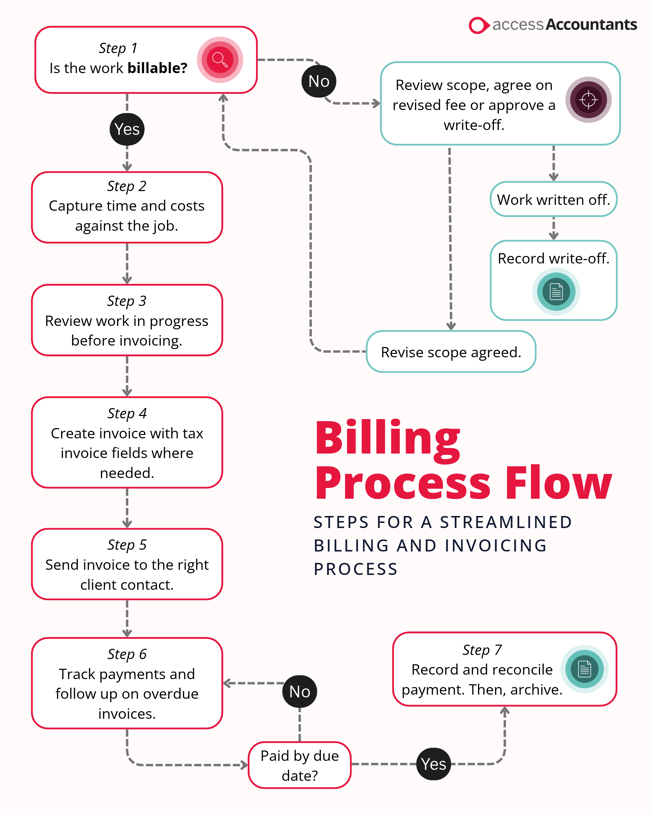
Billing methods for accounting firms
The billing method determines how your firm calculates what to charge clients. The common approaches are hourly, fixed-fee, progress, and value-based.
Hourly billing
Your firm charges for the time spent on the work at an agreed hourly rate. Usually, staff record their time as they complete the work. Then, your firm uses these records to calculate the invoice.
Fixed-fee billing
Your firm charges an agreed amount for a defined service or scope of work, regardless of the time spent.
Progress billing
Your firm invoices the client in stages as work progresses, rather than charging a full amount at the end. This is common for larger or longer engagements with agreed payment milestones.
Value-based billing
Your firm sets a price based on the outcomes delivered to your clients, rather than on the time spent on a job. It’s best suited for firms providing high-impact advisory and structuring services, though it can be challenging to quantify. This approach will require a value conversation with the client.
Tax invoice and record-keeping rules in Australia
A tax invoice records a taxable sale and includes details for GST reporting. Under ATO rules, GST-registered firms must issue a tax invoice when requested.
When is a tax invoice required?
GST-registered businesses that make a taxable sale over $82.50 (GST-inclusive) must issue a tax invoice within 28 days if their client requests one. Sales under $82.50 (GST-inclusive) don't need a tax invoice.
Businesses that aren't registered for GST cannot issue tax invoices. The ATO stresses that their invoices must not include the words 'tax invoice'.
What must a tax invoice include?
Tax invoice requirements depend on the sale amount. A tax invoice must identify the seller, the product or service sold, and how GST applies. For sales under $1,000, it should include:
- The words “tax invoice”.
- The seller's name and ABN.
- The date the invoice was issued.
- A brief description of each item or service, including quantity where applicable and price.
- Whether each sale is taxable.
- The GST amount payable, if any. You can show this separately or include it in the total price with a statement that the price includes GST, where permitted.
For sales of $1,000 or more, you must also include the buyer’s identity or ABN. Check the ATO's tax invoice guidance for full requirements and exceptions.
How long should accounting firms keep billing records?
At least five years. This period usually starts on whichever date comes last: when you created or received the record, or when you completed the transaction. Some records must be kept longer. For example, ASIC requires companies to keep financial records for seven years. See the ATO's record-keeping guidance for the full details.
Common billing and invoicing mistakes
Common mistakes that delay payment include late invoicing, incorrect charges, and missing tax invoice details.
Invoicing late
Some reasons include staff waiting until the end of the month to submit timesheets or a backlog in partner approvals. This pushes back the payment due date and affects your cash flow.
Tip: Set a regular timesheet deadline (e.g., weekly) and assign someone to review and approve completed work promptly. This helps avoid unbilled work piling up.
Invoices that don’t match the agreed scope or fee
This can happen when staff completes out-of-scope work without approval, doesn't record fee changes, or uses outdated rates. Clients may dispute the charges or delay payment until your firm resolves the issue.
Tip: Before sending invoices, always check each invoice against client engagement terms and approved changes. Always get client approval for any extra work and fees.
Missing tax invoice fields when the client needs them
Missing supplier details, ABNs, or GST information prevent clients from processing invoices or claiming GST credits. Your firm will have to issue a corrected invoice, delaying payments.
Tip: Use an invoice template that includes tax invoice fields. Check the GST treatment before issuing it.
Choosing time and billing software for your accounting firm
Match the tool to your firm's current fee model, team size, and ledger. Using software automates time capture and invoicing, speeding up billing and reducing manual errors. Picking the right one simplifies billing without adding new bottlenecks.
What to check before you shortlist
Compare your firm's current fee model, team size, and ledger with what each software offers:
- Fee model compatibility: Supports your firm's billing methods, whether that's hourly, fixed-fee, progress billing, or a mix.
- Team size and pricing: Offers pricing that fits your team. Pricing can be flat-rate or per-user.
- Ledger integration: Connects with your existing accounting general ledger to reduce duplicate data entry and manual errors.
- Time capture: Lets staff automatically record billable and non-billable hours against the correct client, project, or task.
- Payment tracking: Shows paid, outstanding, and overdue invoices so you can track your incoming payments.
- Billing reports: Gives insights into work in progress, unbilled time, utilisation rates, and overdue accounts.
Tip: Check which features each plan includes, as some vendors charge extra for integrations, reporting, or additional users. Ask for a demo using a typical billing process in your accounting firm.
Where Access Accountants fits
Access Accountants combines billing and invoicing, time tracking, job management, and client management into a unified accounting practice management solution.
By consolidating billing and invoicing with your wider accounting practice, you gain a single source of truth and connected workflows. For billing and invoicing, this means faster, automated data retrieval that's less prone to manual errors.
Some of its time and billing capabilities include:
- Online timesheets
- Visibility of WIP by partner, manager, or team member
- Productivity reporting against predefined budgets
- Invoice creation based on completed jobs, WIP, time and materials, fixed fees, or recurring fees.
Explore Access Accountants to see how it can improve your firm's billing and invoicing process.
FAQ
What is the billing and invoicing process?
A sequence of steps for turning billable client work into invoices and recorded payments. Steps involve confirming the agreed scope, recording time and costs, reviewing WIP, creating and sending an invoice, following up on payments, and reconciling the amount received.
What is the difference between billing and invoicing?
Billing is the full process of managing a business's payment lifecycle. It involves setting fees, tracking work, invoicing, collecting payments, following up on overdue invoices, and recording transactions. Invoicing is part of billing where you create and send a payment request for goods or services rendered.
When do you need to issue a tax invoice in Australia?
When a customer requests it, a GST-registered business making a taxable sale over $82.50 must issue a tax invoice. The firm has 28 days from the customer’s request to provide it. If you’re not GST-registered, you only need to issue a regular invoice.
What must a tax invoice include?
A tax invoice must include the words “tax invoice,” the seller’s name and ABN, the issue date, the goods or services supplied, the price, and the GST treatment. For sales of $1,000 or more, it must also identify the buyer or their ABN.
How long should accounting firms in Australia keep invoices and billing records?
At least five years after the record was created or received, or the transaction was completed, whichever happens last, as stated in the ATO’s rules on record-keeping for businesses. Some records, like company financial records, must be kept for at least seven years, in line with ASIC requirements.
Do you need time and billing software to invoice clients?
Not necessarily. A firm can prepare invoices manually. But there is an advantage to using time and billing software for accountants, especially if you’re a scaling firm handling a growing client base and workload. Since software automates the billing and invoicing process, billing becomes faster and less error-prone, supporting business growth.
